

Conditional Access has become one of the most important security controls available in Microsoft Entra ID. It sits between an identity and the resource that identity is attempting to access, using signals such as authentication strength, device state, location, risk, and the application being accessed to determine whether an access token should be issued.
For most organizations, Conditional Access has traditionally been designed around people. A user authenticates, Microsoft Entra evaluates the request, and policy determines whether that user should be allowed to continue.
AI agents introduce a different problem.
An agent might operate on behalf of a user, perform actions autonomously without a user being present, or operate using an identity that looks much more like another employee within Microsoft 365. In each case, the agent needs some form of identity and authorization to access organizational resources.
That means organizations increasingly need to answer another Conditional Access question:
Should this AI agent be allowed to access this resource, using this identity, under these conditions?
Microsoft is beginning to answer that through Microsoft Entra Agent ID and Conditional Access support for agent identities.
AI Agents Are Becoming Identities
One of the mistakes organizations could make as they begin adopting agents is treating them simply as applications. Traditional applications tend to follow relatively predictable authentication and authorization patterns. An application authenticates, requests a set of permissions, performs a defined function, and returns a result.
Agents can behave differently.
An agent can receive an objective, interpret information, select tools, interact with several services, evaluate the results of those actions, and then decide what should happen next. In some cases, it can do all of that without a human actively participating in the process.
That changes the security problem.
Microsoft Entra Agent ID introduces identity constructs designed specifically to represent AI agents. Instead of forcing every agent completely into the traditional application or user identity model, Entra can represent the agent as its own security principal. That might sound like a relatively small distinction, but from a security perspective it is extremely important. Once the agent has an identity, we can start asking many of the same questions we already ask about people.
- Who is this identity?
- What is it allowed to access?
- What permissions does it have?
- Is its behavior considered risky?
- Where is it operating from?
- What happens when it no longer needs access?
Most importantly, we can begin making access decisions based on the agent itself.
Conditional Access Still Happens During Token Issuance
The fundamental Conditional Access model does not really change just because an AI agent is involved. If an agent needs to access something protected by Microsoft Entra ID, such as Microsoft Graph, SharePoint, an API, or another protected resource, it generally needs an access token. Microsoft Entra evaluates applicable Conditional Access policies before issuing that token.
If the policy requirements are satisfied, the token can be issued and presented to the resource. If the requirements are not satisfied, access can be blocked. The interesting part is determining which identity Conditional Access should evaluate.
- With a normal user session, that is fairly obvious. The user is the identity requesting access.
- With an agent, the answer depends on how the agent is operating.
Microsoft currently describes several important access patterns, including an agent acting on behalf of a user, an autonomous agent using its own identity, and an agent operating through an associated agent user account. Those models might all involve an AI agent, but from an identity perspective they are very different.
When an Agent Acts on Behalf of a User
One of the most common agent scenarios is likely to involve the agent performing an action for an authenticated user. Imagine asking an agent:
Find the email conversations relating to Project Alpha and summarize the outstanding actions.
- The agent needs access to your mailbox, but it is accessing that mailbox because you asked it to do something.
- The agent is effectively acting on your behalf.
Microsoft can use the OAuth On-Behalf-Of flow, often shortened to OBO, for this type of access. The agent exchanges the token associated with the user's session for another token intended for the downstream resource.
The important detail is that the user remains the subject of the resulting access token.
The token can also contain information identifying the agent involved in the request, but Conditional Access policy is still fundamentally evaluating access associated with the user. Conceptually, the flow looks something like this:
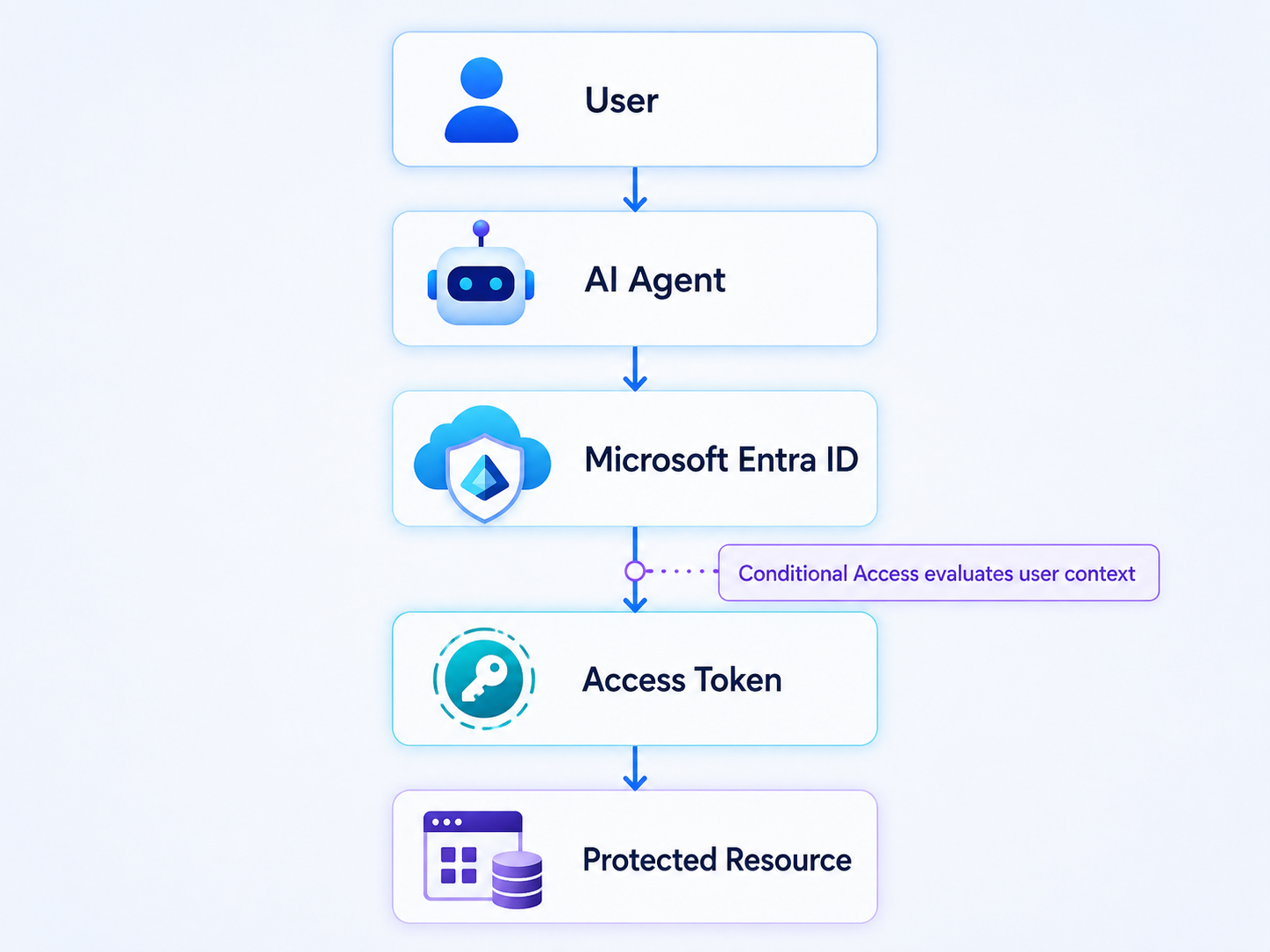
The presence of an AI agent does not somehow remove the user from the security model. If the user normally requires a particular authentication strength or is restricted from accessing a resource under certain conditions, an agent acting on that user's behalf should not magically bypass those requirements. That is an important distinction because the agent is effectively operating with delegated authority.
When an Agent Acts as Itself
The identity model becomes more interesting when there is no user involved. Consider an agent responsible for generating a daily operational report. Every morning it connects to several systems, gathers information, analyzes the results, generates a report, and publishes that report somewhere for the management team.
-
Nobody signs in.
-
Nobody clicks a button.
-
Nobody is actively sitting behind the agent while it performs the task.
In that scenario, the agent needs to operate using its own identity. This type of access typically uses an application-only model such as the OAuth client credentials flow. The agent authenticates as itself and requests an access token for the resource it needs to access. The resulting flow begins to look more like:
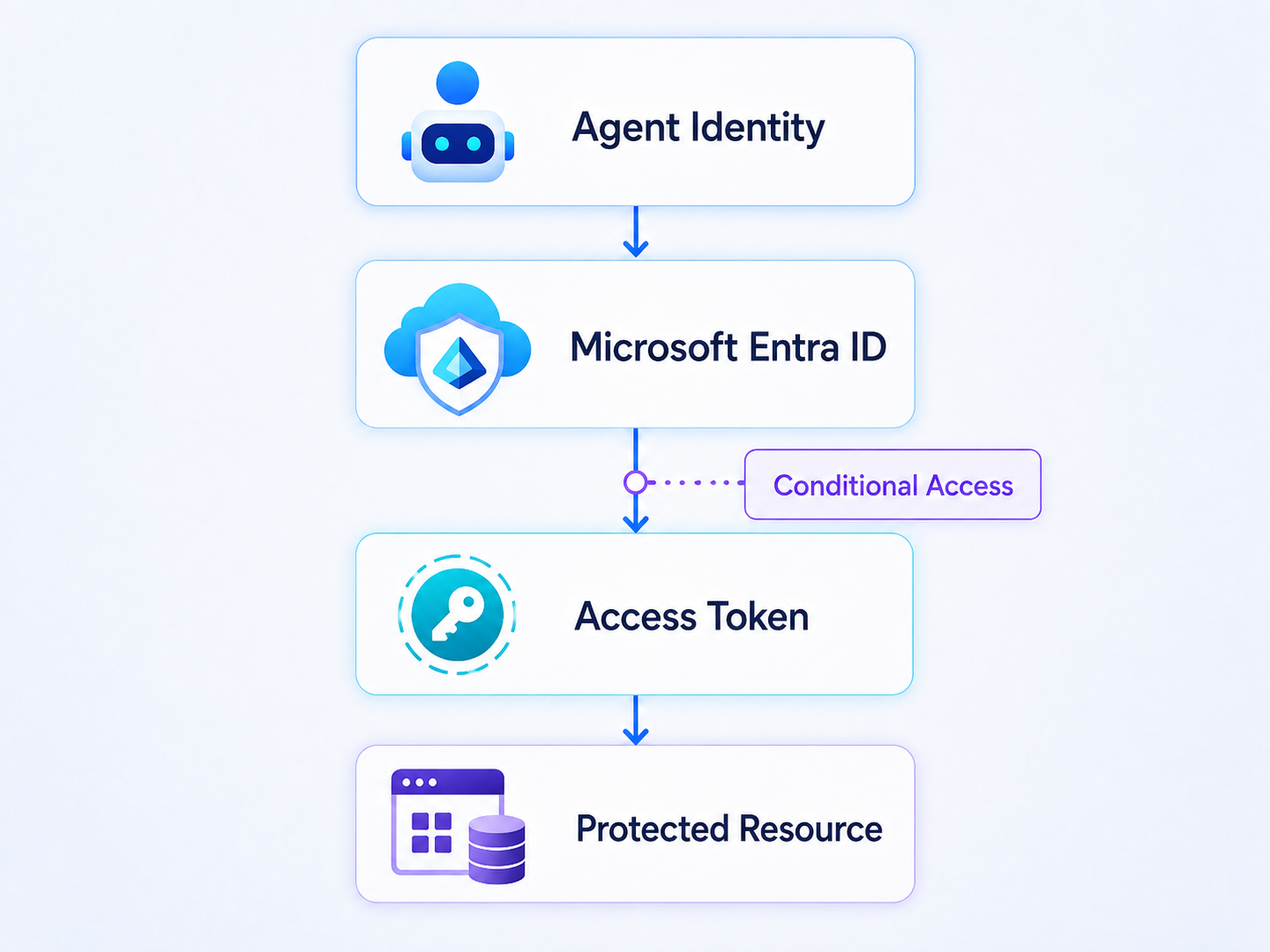
Now the agent identity is the subject of the token. That means Conditional Access can evaluate policies targeted specifically at that agent identity. This is where Conditional Access for agents becomes particularly interesting because the security boundary begins following the identity that is actually doing the work. An organization could allow approved agents to access a particular resource while preventing other agents from doing so. Risk associated with the agent could also become part of that decision. From a Zero Trust perspective, that is exactly what we want.
The fact that an agent possesses credentials should not automatically mean that we trust the agent.
Identity should establish who the agent is. Policy should determine what that identity is allowed to do.
Agents Can Also Have User Accounts
There is another model that I find particularly interesting because it moves AI agents closer to behaving like digital workers. Some agents might need capabilities normally associated with a user account rather than simply application-level API access. An agent could potentially need a mailbox, calendar, Teams capabilities, group memberships, licenses, or access to resources that are normally associated with users.
Microsoft supports this through an agent user account associated with the agent identity.
That allows the agent to participate within Microsoft 365 in a way that looks much more like another organizational identity. The account can potentially receive licenses, belong to administrative units, be granted access to resources, and participate in Microsoft 365 services.
That creates another Conditional Access consideration.
When the agent operates through its agent user account, the agent user account becomes the subject of the token. That means a policy targeting the underlying agent identity does not automatically mean that the associated agent user account is also protected by the same policy. The distinction is important.
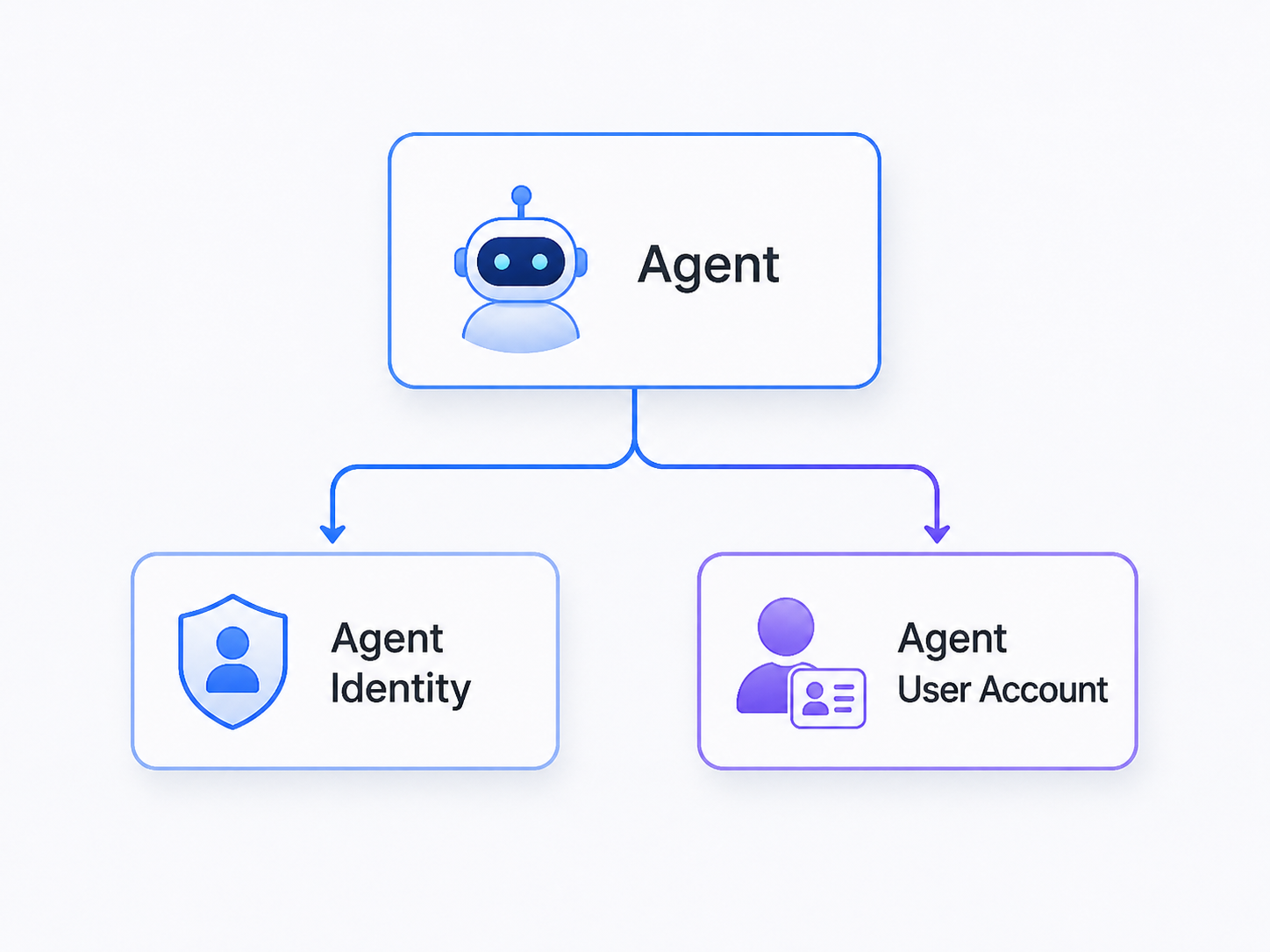
Both represent aspects of the same agent, but they can participate in authentication differently. Organizations therefore need to understand which identity is actually being used before deciding how Conditional Access should be applied.
Agent Identity Blueprints Make This Scalable
Managing agent identities individually will probably work while an organization has five agents. It will not work particularly well when the organization has five hundred.
Microsoft Entra Agent ID introduces agent identity blueprints to help address that problem.
A blueprint represents a type or class of agent from which individual agent identities can be created. Rather than building every identity as something completely independent, organizations can establish repeatable identity patterns. Imagine an organization has an agent responsible for financial reporting. The architecture might look like:
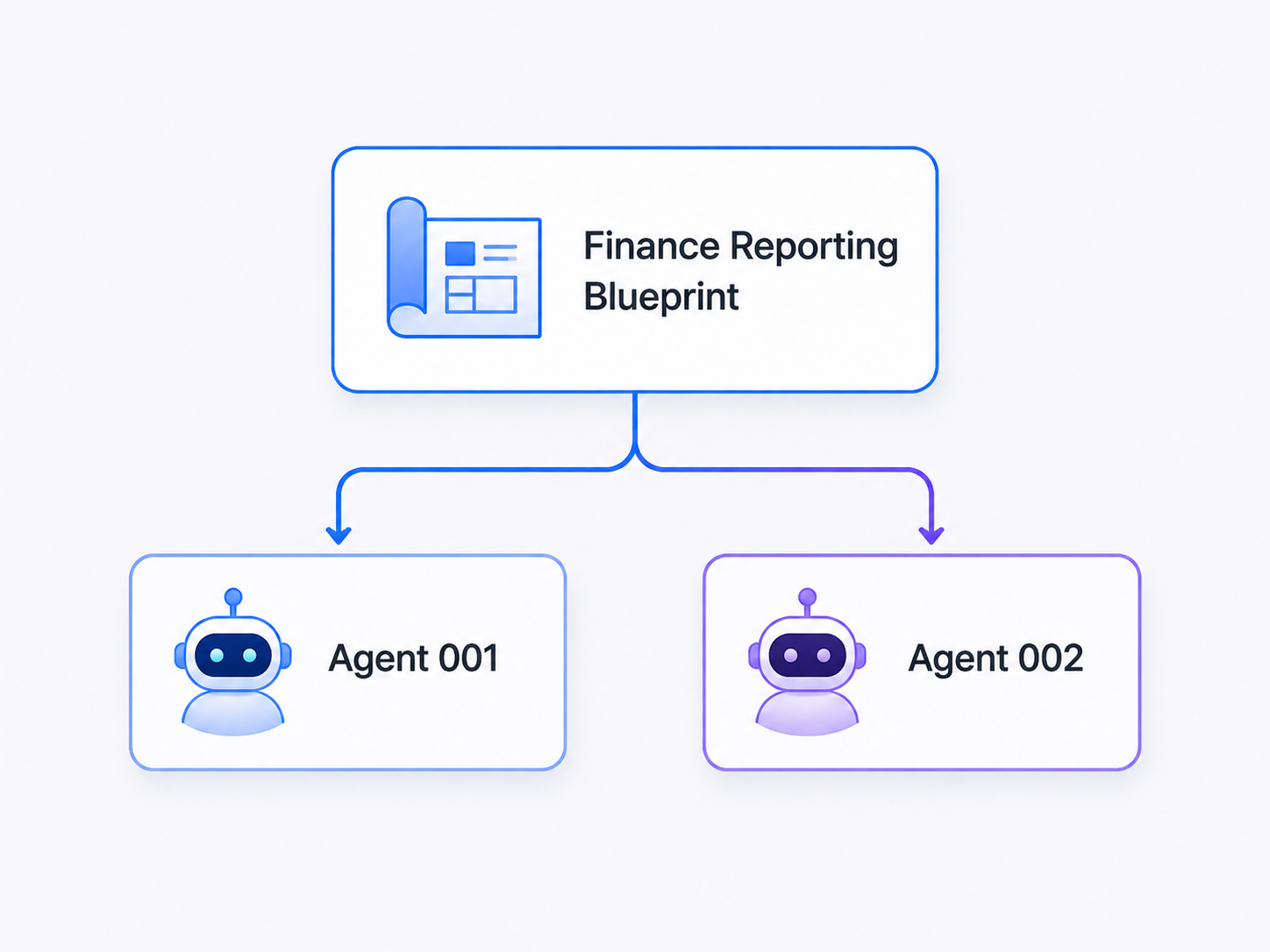
Perhaps one agent operates within the US business while another performs a similar function within Europe. Both originate from the same blueprint. Conditional Access can target the blueprint so that policies apply to the agent identities created from it. That is significantly easier than constantly updating policies every time another instance of the agent is deployed.
The policy follows the class of agent rather than requiring administrators to continuously maintain lists of individual identities.
That starts to look much more like the scalable identity policy model we already use elsewhere in Microsoft Entra. There is an important detail, however. A Conditional Access policy targeting an agent identity blueprint applies to the agent identities created from that blueprint. It does not automatically protect the associated agent user accounts. Those accounts need to be considered separately.
Attributes Can Provide Business Context
Blueprints are useful when policy needs to follow the type of agent, but organizations will eventually need additional classification. Not every security decision can be based entirely on what agent template was used. An agent might need to be classified according to its environment, business function, data sensitivity, level of autonomy, ownership, or the type of resources it is permitted to access.
Microsoft supports the use of custom security attributes with agent identities. That allows Conditional Access policy to potentially follow business context rather than individual identities. For example, an organization could assign attributes such as:
- Environment = Production
- DataAccess = Restricted
- BusinessUnit = Finance
A Conditional Access policy could then target identities matching the appropriate attribute. This becomes extremely useful as the number of agents increases. Instead of maintaining a policy containing hundreds of individual identities, administrators can establish classifications and allow the policy engine to determine which agents belong within that security boundary. The architecture becomes:
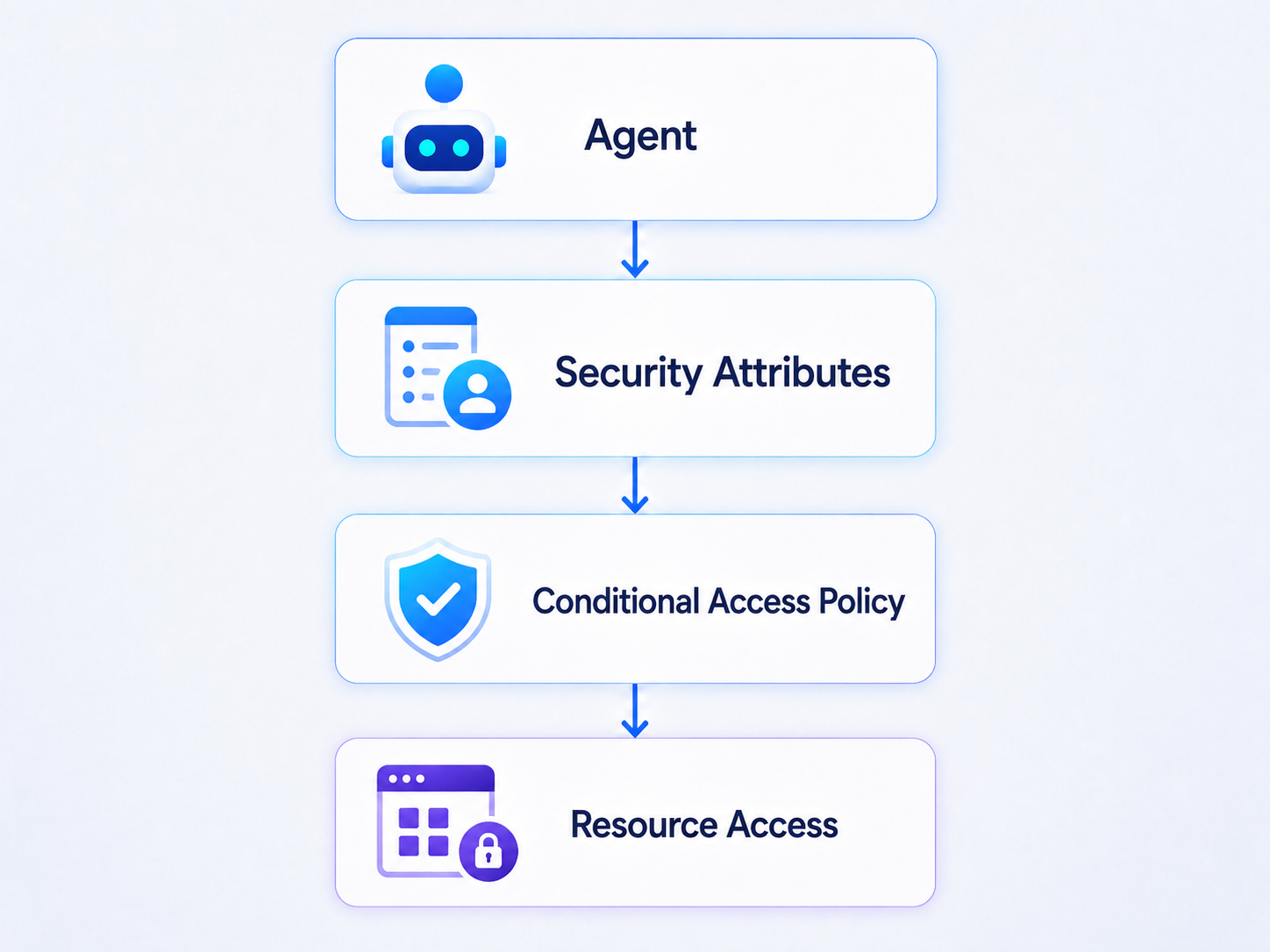
That is much more sustainable. It also encourages organizations to begin thinking about something they will eventually need anyway: agent classification.
Agent Risk Comes to Conditional Access
Conditional Access becomes considerably more useful when identity alone is not the only signal being evaluated. Microsoft Entra ID Protection can provide risk information associated with an agent identity, and Conditional Access can use agent risk as part of an access decision. That gives us a security model that looks familiar.
Microsoft Entra can identify an agent, observe signals relating to that identity, determine that the identity represents some level of risk, and allow Conditional Access to respond. Risk can be evaluated at levels such as low, medium, or high. That creates the possibility of a policy similar to:
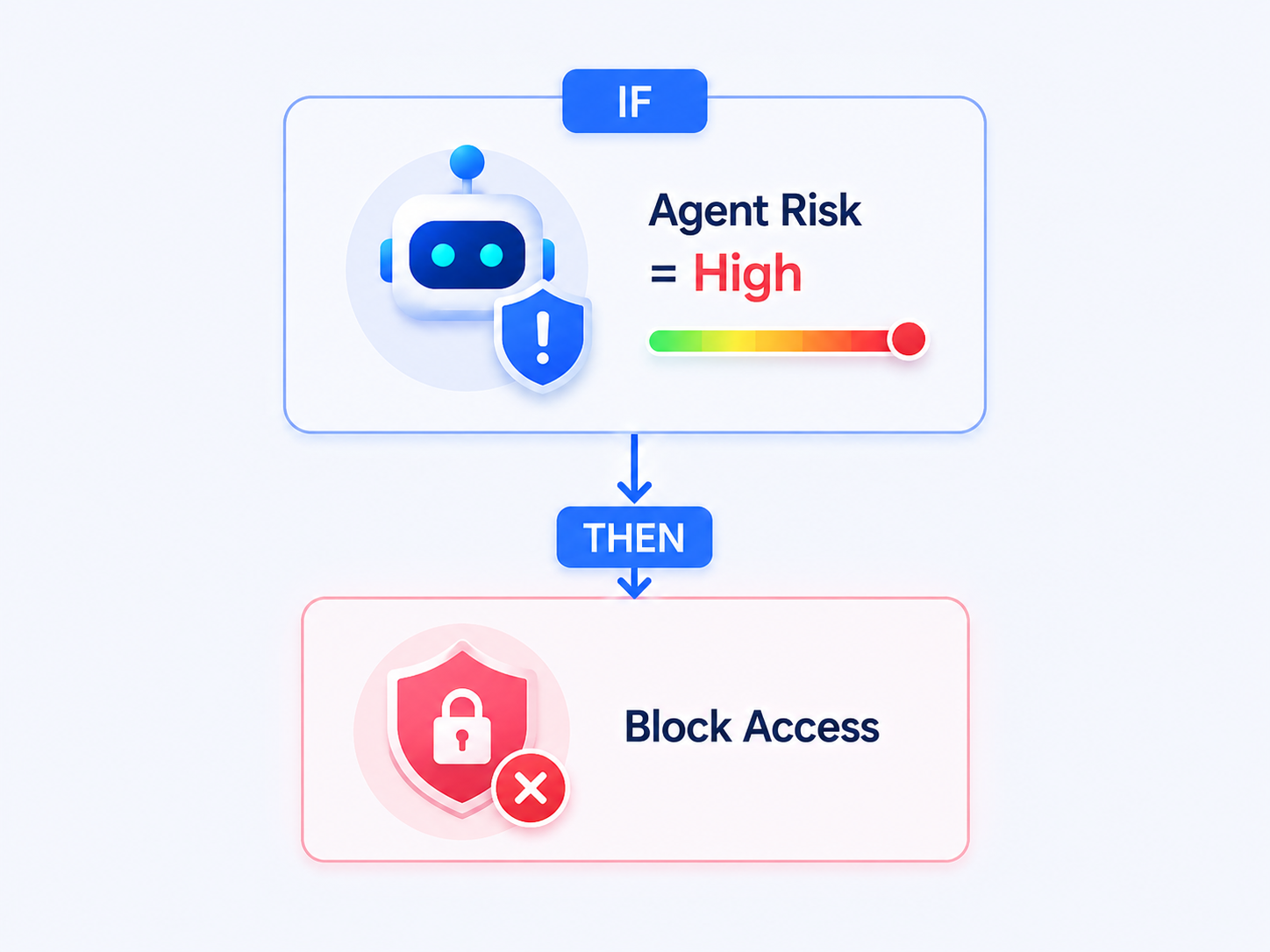
This is particularly important for autonomous agents. With a normal user, a risky authentication can sometimes be remediated by requiring stronger authentication. The user might be asked to complete multi-factor authentication or satisfy another authentication-strength requirement. An autonomous agent cannot pick up its phone and approve a Microsoft Authenticator notification. For an autonomous identity, blocking access can therefore become the appropriate response.
When an agent's identity is considered compromised, the safest action might simply be to stop issuing access tokens to it.
That is one reason risk-based Conditional Access becomes particularly important as organizations deploy autonomous agents.
Execution Environment Matters Too
Identity tells us who the agent is. It does not necessarily tell us where the agent is operating. That becomes another useful Conditional Access signal. Agents do not have to run exclusively inside managed cloud services. Microsoft is also developing scenarios where agents operate inside controlled execution environments, including Windows-based environments such as Cloud PCs for Agents. Conditional Access includes an Agent execution environments condition designed to help identify these types of sessions. This begins to create a much richer access decision. Instead of simply asking:
Is this an approved agent?
we can eventually ask:
Is this an approved agent operating from an approved execution environment and attempting to access an approved resource?
That looks much more like the Zero Trust model we already use for human users. For a user, we might evaluate:
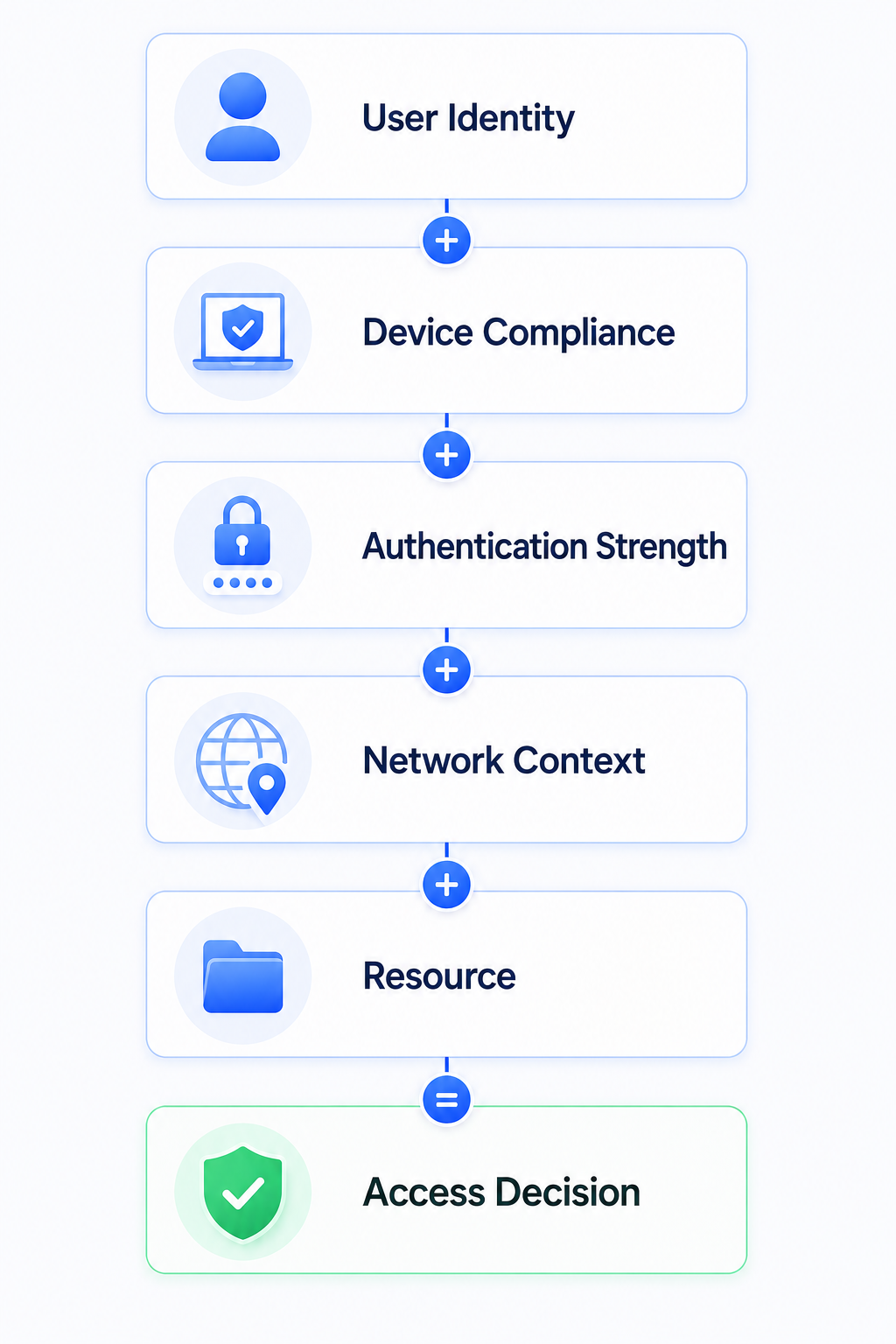
For an agent, the model begins evolving toward:
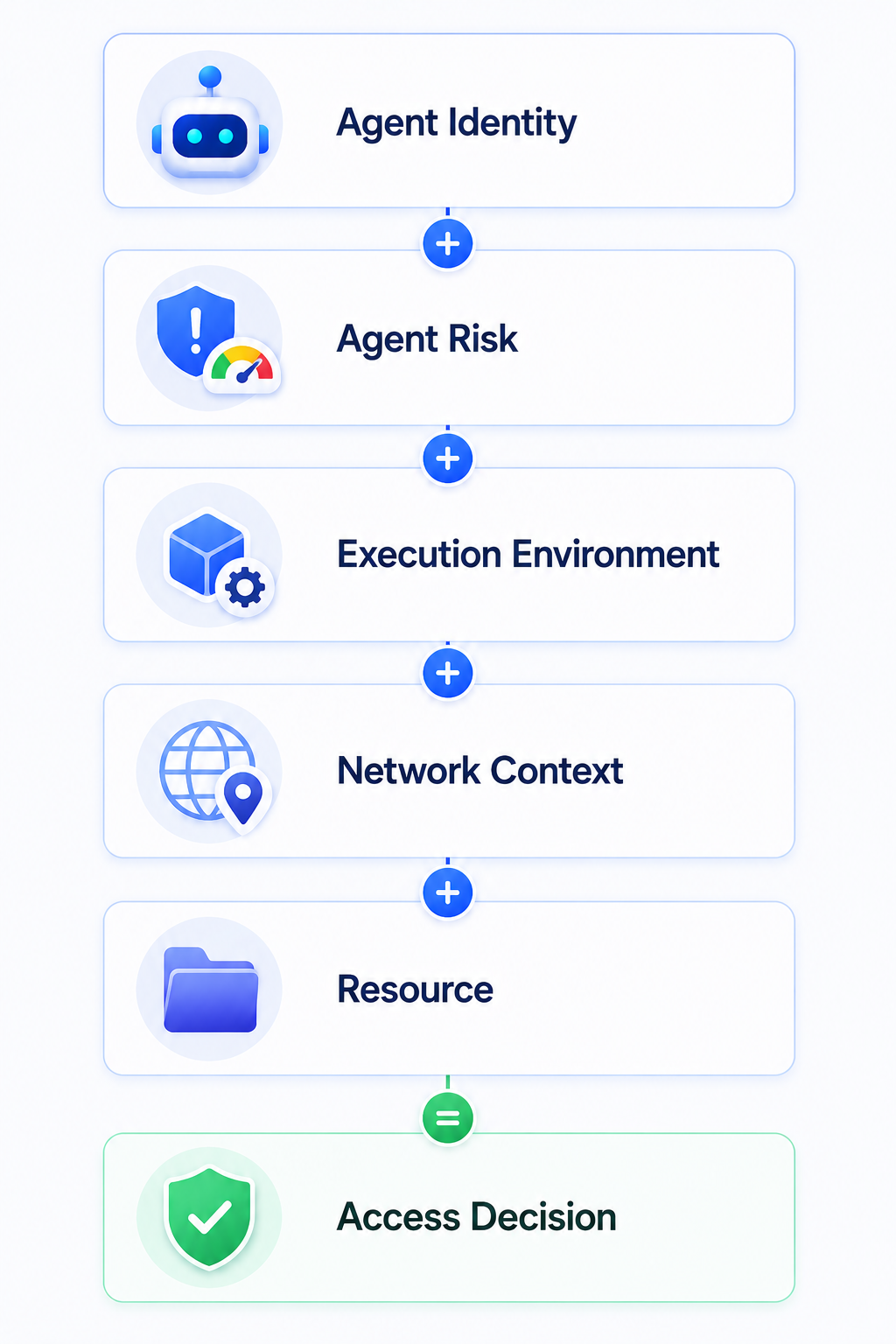
The identities are different, but the underlying security principle is the same.
Trust should be derived from multiple signals rather than from possession of a credential.
Conditional Access Only Works Where Entra Is Involved
There is one limitation that organizations need to understand before assuming Conditional Access protects every action performed by an agent. Microsoft Entra needs to participate in the authentication process. Imagine an agent connects to an external API using a static API key:
- Microsoft Entra ID never participates in that transaction.
- No Entra access token is requested.
- Conditional Access therefore has nothing to evaluate.
Compare that with:
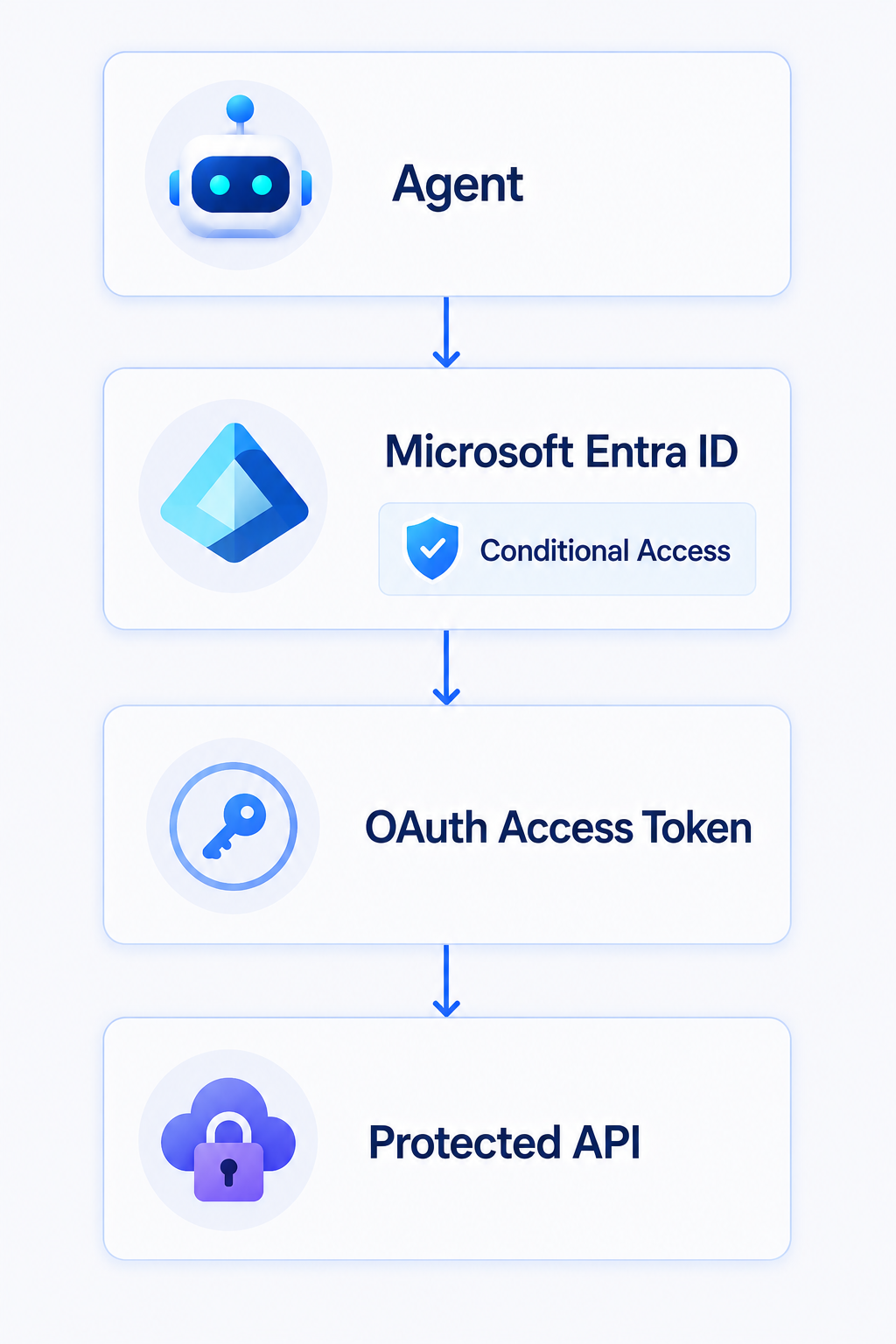
Now Microsoft Entra participates in token issuance, which gives Conditional Access an opportunity to evaluate policy. This distinction is going to become extremely important as organizations build enterprise AI platforms. An organization cannot claim that an agent is protected by Conditional Access if many of the agent's tools authenticate directly using API keys or credentials stored inside the agent platform. The architecture around the agent matters just as much as the Conditional Access policy.
If you want identity controls to govern agent access, the identity provider needs to be part of the access path.
Where possible, organizations should favor modern authentication patterns where Microsoft Entra issues the token rather than relying heavily on long-lived API keys and secrets.
Existing Conditional Access Policies Do Not Automatically Solve This
One of the things administrators need to avoid is assuming that existing Conditional Access policies automatically protect agent identities. They do not necessarily do that. Agent identities and agent user accounts introduce new policy targets and new authentication scenarios. A policy targeting All users, for example, does not simply mean every possible agent-related identity is automatically included. Policies targeting an agent identity also do not automatically cover its associated agent user account.
Blueprint targeting introduces another distinction because the policy can follow agent identities created from that blueprint without automatically extending to every related identity type. This means organizations need to deliberately extend their Conditional Access architecture. That does not necessarily mean creating dozens of new policies immediately. It means understanding:
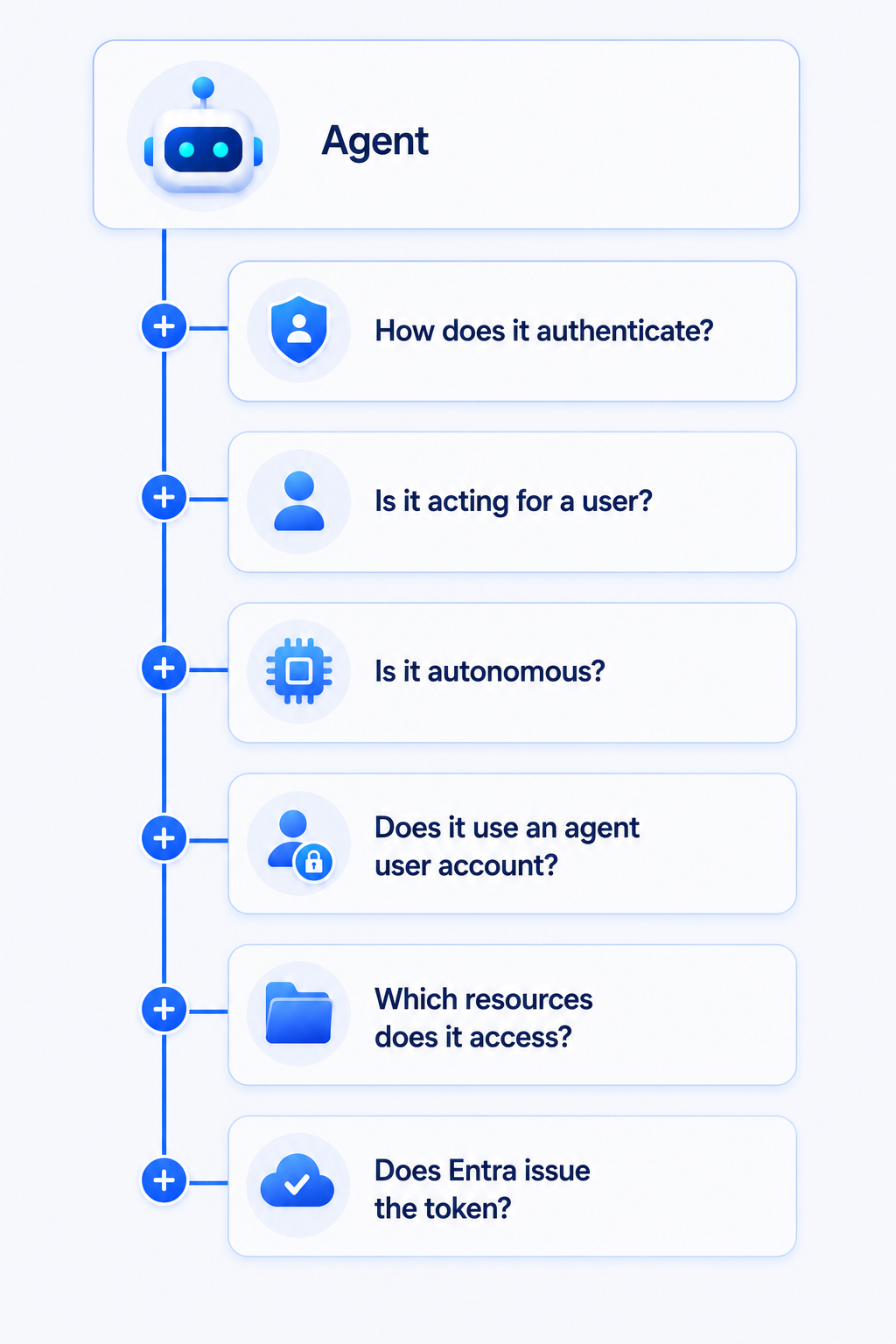
Only after answering those questions can you determine which Conditional Access policy should apply.
Start Building an Agent Conditional Access Baseline
Most mature Microsoft 365 environments already have some form of Conditional Access baseline. Those policies might address privileged identities, MFA, authentication strength, unmanaged devices, risky users, risky sign-ins, network locations, legacy authentication, or access to sensitive applications. Agents need to become another part of that architecture. I would not start by immediately creating dozens of highly granular agent policies.
The first step should be discovering the agents that exist and understanding how they operate. That means identifying the agent identities, determining which resources they can access, understanding whether they operate autonomously or on behalf of users, identifying agent user accounts, documenting the authentication mechanisms they use, and determining whether those authentication flows actually pass through Microsoft Entra. Once that information exists, organizations can begin creating a sensible baseline. A simplified model could look like:
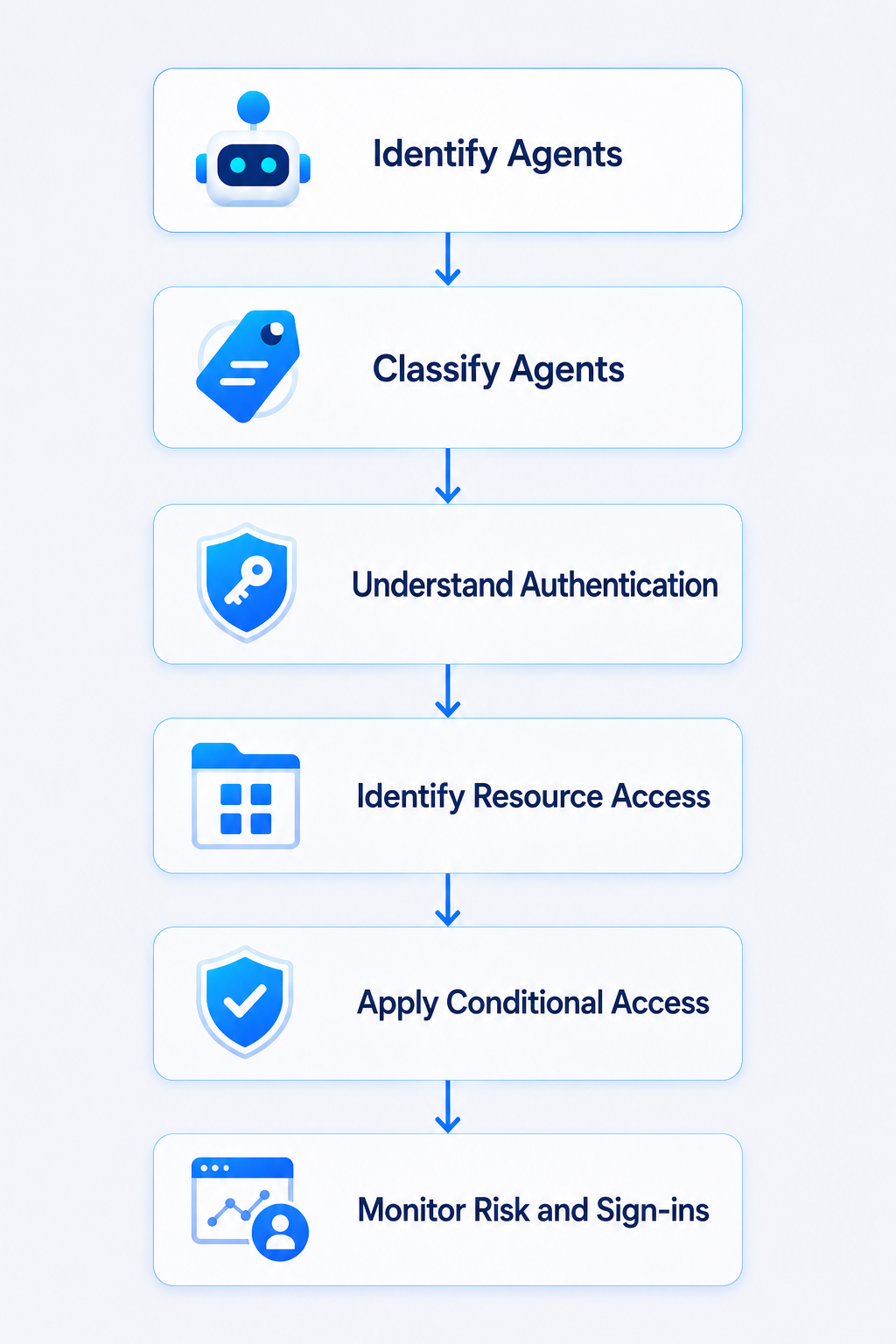
The objective is not simply to create policies because Microsoft added new controls.
The objective is to determine where agents belong within the organization's trust model.
Agent Identity Needs Governance Too
Conditional Access controls whether access should occur at a particular moment. It does not answer every identity governance question. As agent adoption grows, organizations are also going to need to think about lifecycle.
- Who requested the agent?
- Who owns it? What data can it access?
- Who approved those permissions?
- How long should the identity exist? What happens when the project finishes?
- What happens when nobody owns the agent anymore?
Those are exactly the types of questions organizations already struggle with for service accounts and application identities. Agents could make that problem considerably larger. The complete security model therefore needs more than Conditional Access. It needs identity governance around creation, ownership, permissions, reviews, lifecycle, and eventual removal. Conditional Access then becomes the runtime policy layer controlling whether that governed identity can actually access a resource. The relationship looks something like:
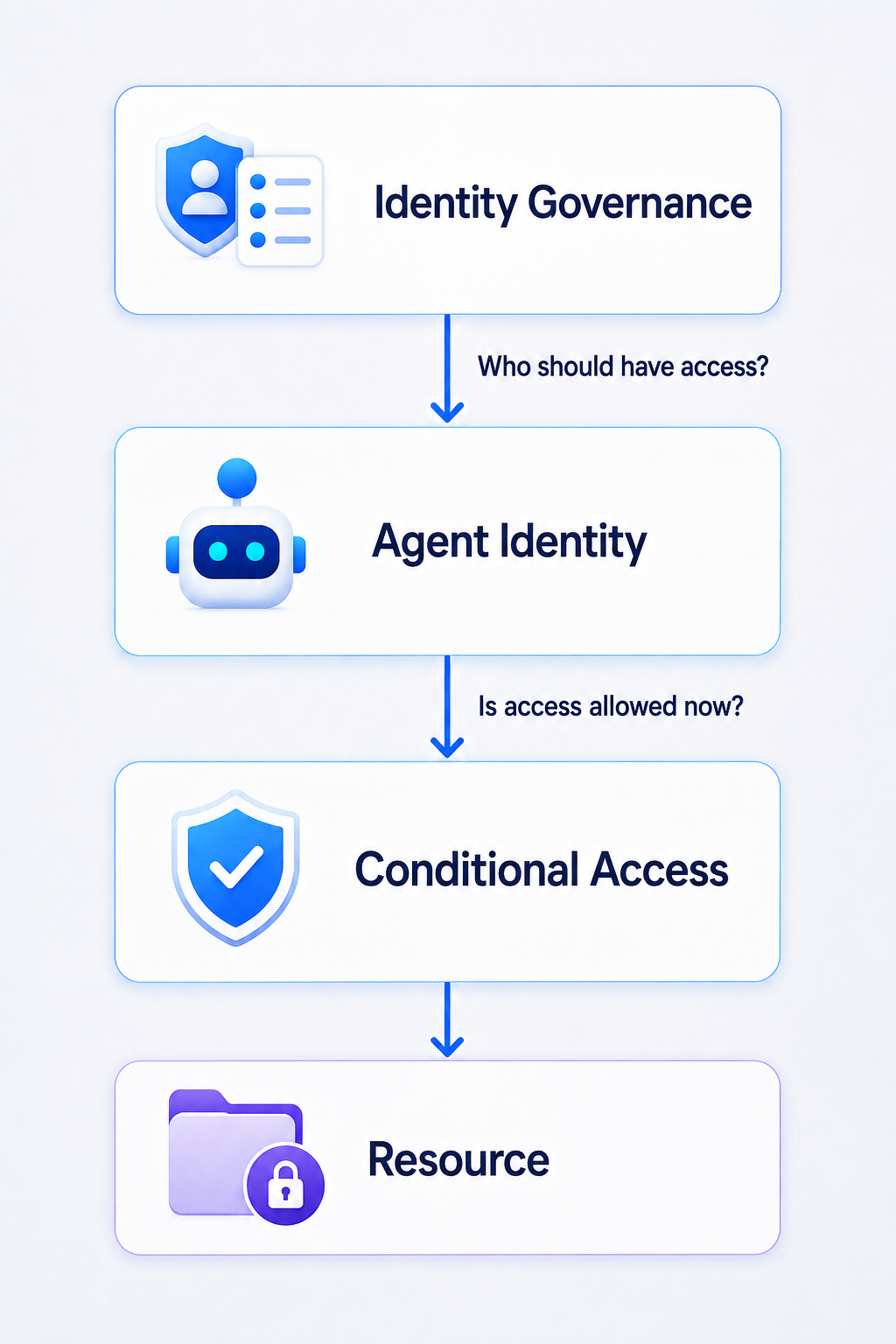
Both sides matter.
Zero Trust Now Includes Machines That Make Decisions
Zero Trust has traditionally been discussed in terms of users, devices, applications, networks, workloads, and data. AI agents blur several of those boundaries. An agent can authenticate like an application, operate using delegated authority from a user, have its own identity, potentially have its own user account, interact with several applications, and make decisions that result in actions occurring elsewhere in the environment. That makes identity increasingly important.
If an agent can read email, access SharePoint, interact with APIs, retrieve documents, send messages, update records, or execute business processes, we need to know which agent performed those actions and under what authority.
- Microsoft Entra Agent ID gives the agent an identity.
- Microsoft Entra ID Protection can provide risk signals around that identity.
- Conditional Access determines whether that identity should be permitted to obtain a token for a resource.
- Identity Governance can help control the lifecycle and entitlements associated with the identity.
Together, those capabilities begin to extend the identity security model organizations have spent years building for employees into a new population of non-human identities. There is one significant difference.
These identities can potentially reason about what action to perform next.
That makes governing them considerably more important.
Conditional Access Is Becoming More Than a User Policy Engine
I have never viewed Conditional Access as simply an MFA configuration feature. It is an identity policy engine. The expansion into AI agents reinforces that. A traditional Conditional Access decision might ask:
Can this user access this application?
Over time that question became more sophisticated. Is the device compliant? What authentication strength was used? Is the user risky? Is the sign-in risky? Where is the connection coming from? Which resource is being accessed? AI agents introduce another version of the same question:
Should this agent be allowed to access this resource, using this identity, from this execution environment, with this level of risk, at this particular moment?
That is where Conditional Access for AI agents fits. Organizations should not wait until hundreds of agents are operating across Microsoft 365 and Azure before deciding how agent identities should be secured. The identity model, authentication mechanism, permissions, execution environment, resource access, governance, and Conditional Access requirements should be considered as part of the architecture of the agent itself. Because once an AI agent can access organizational resources and perform actions inside the environment, it is no longer simply another AI feature.
It is an identity that needs to be trusted, governed, monitored, and sometimes blocked.