
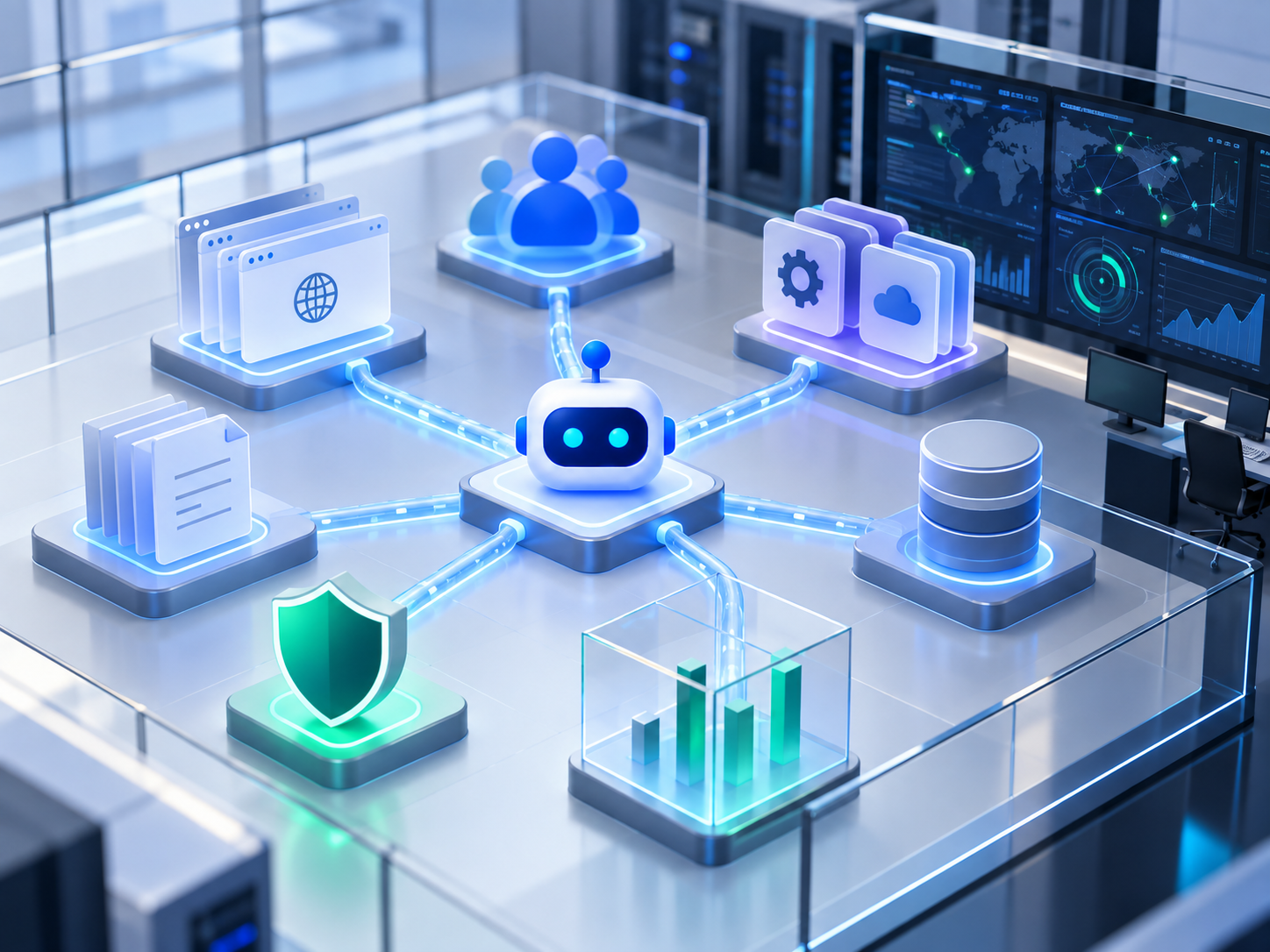
This article is the second in a series. In the first article, I described how specialist AI agents could collaborate during security reconnaissance. This time, we will step inside the self-contained lab built to test that idea.
The interesting part of an agent-based security assessment is not whether an AI model can run a command. It is whether several constrained agents can examine an environment, share evidence, make useful handoffs, validate what they find, and explain the path that connects one discovery to another.
To explore that properly, the agents need more than a single vulnerable page. They need an environment that feels connected. It should contain applications, identities, APIs, operational clues, authentication boundaries, defensive telemetry, and enough realistic detail for one observation to influence the next phase of an investigation.
That is the purpose of this lab.
It contains two fictional organizations: Helixora Therapeutics, a biopharmaceutical company, and Northstar File Relay, an external-style controlled file-sharing platform. Around them are an employee directory, a program API, a staging application, a shared evidence store, several specialist agents, and a coordinator responsible for the assessment workflow.
Everything described in this article runs locally. The companies, people, systems, credentials, records, and data are fictional and exist only for the learner lab.
Why Build a Fictional Company?
A lab becomes much more useful when its systems tell a coherent story.
An isolated endpoint can demonstrate a specific control failure, but it does not provide much room for reconnaissance or correlation. A learner needs to see how public information can reveal identities, how application metadata can identify another service, how files can disclose operational context, and how several individually small observations can combine into a meaningful path. Helixora gives the lab that context.
The company has executives, managers, scientists, clinical operations personnel, and IT staff. Employees have job titles, photographs, email addresses, telephone numbers, office locations, and internal identifiers. Research programs have owners and operational records. Applications refer to one another in the same imperfect ways that real environments often accumulate over time.
None of those details has much value in isolation. Together, they provide the raw material for reconnaissance.
Helixora Therapeutics
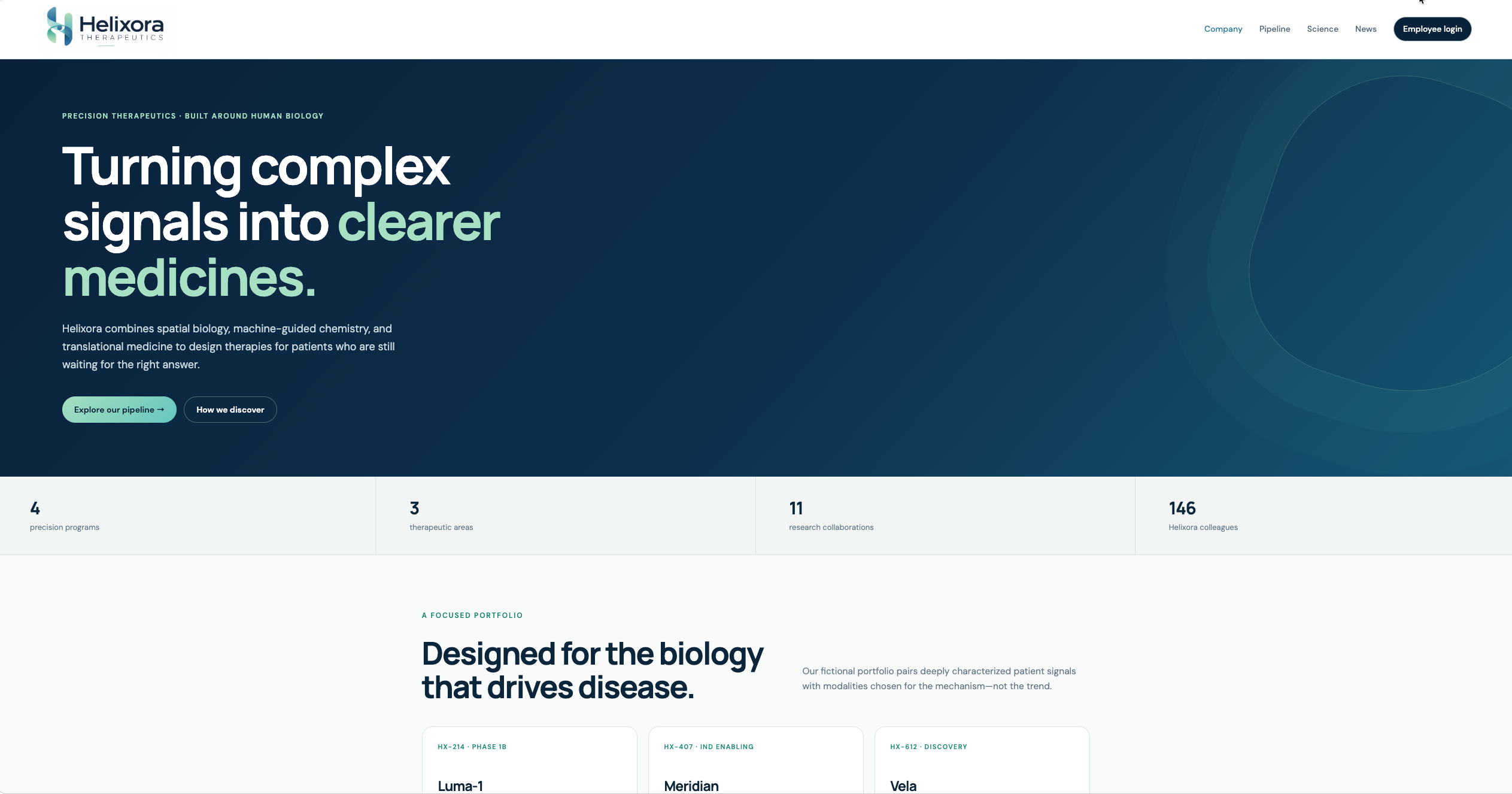
Helixora Therapeutics is the primary fictional organization in the lab. Its public website presents a modern biopharmaceutical company working across translational science, immunology, spatial biology, and clinical development. The public-facing experience contains the kind of information an organization might reasonably publish:
- company and research-program information;
- leadership and employee profiles;
- department and role details;
- office locations and contact information;
- references to related applications and services.
This makes the site useful to the reconnaissance agent before any authenticated interaction occurs. The agent can build an initial picture of the organization, identify interesting roles, record naming conventions, and discover the other components that deserve investigation.
The public site is not simply decoration. It establishes the identity and application context used throughout the rest of the assessment.
The Employee Portal
The main Helixora application includes an employee sign-in experience. Once authenticated, a user can view an employee profile and access internal program information.
The profile is deliberately richer than a simple username. It includes the employee's name, photograph, title, department, contact details, office, employee identifier, and recorded role. That lets the agents compare what the directory says a person should be able to do with what the application actually permits. For example, the directory records Maya Chen as a scientist. Other evidence in the lab can then be used to determine whether her authenticated session receives access consistent with that role.
This distinction matters because authentication and authorization are not the same control.
- Authentication asks: Who is this user?
- Authorization asks: What is this user allowed to do?
A successful login proves identity only to the extent implemented by the application. It does not prove that every page, operation, or API response reached by that session is appropriate for the user's recorded role.
The portal therefore gives the analysis and validation agents something meaningful to correlate. They are not merely checking whether a page loads. They are comparing identity evidence, application behavior, and access boundaries.
The Helixora Program API
Behind the portal is a separate program API. It contains project information, program operations, deployment metadata, and data associated with Helixora's internal work. The API is intentionally more substantial than a single demonstration endpoint. It exposes multiple route generations and response types so that an agent must enumerate the surface and distinguish current behavior from legacy behavior. This gives the lab several useful questions to answer:
- Which routes require authentication?
- Do older routes enforce the same controls as newer ones?
- Does a response disclose data beyond what the caller needs?
- Does an authenticated role receive access to restricted operations?
- Do metadata and error responses reveal other components?
The returned records contain fictional personal and operational information. That makes the impact of excessive disclosure visible in the final report without using real personal data.
The API is treated as its own application boundary. Finding the website does not automatically mean the agent understands the API behind it.
The Directory Service
The directory service represents Helixora's identity data. It supplies the organizational record used to correlate people, titles, departments, identifiers, and roles. The directory contains a deliberately varied workforce:
- executive leadership;
- research and clinical management;
- scientists and regular employees;
- systems administrators;
- identity and access personnel;
- IT support and operations staff.
This information supports several parts of the investigation. The reconnaissance agent can learn the organization's naming conventions. The analysis agent can compare an application session with the directory role. The validation agent can repeat those checks. The application security specialist can examine whether the directory interface exposes more information than intended. The result is a connected identity model rather than a collection of unrelated usernames.
Person > employee record > department > role > application access
When those relationships do not agree, the mismatch becomes evidence worth investigating.
The Staging Environment
Helixora also has a staging mirror. It resembles the primary portal but exposes different metadata and deployment details.
Staging systems are useful in a reconnaissance lab because they frequently explain how an application was assembled. They may contain build information, environment names, integration references, older routes, diagnostic output, or configuration that is absent from the production-facing experience.
In this environment, the staging application helps the agents identify relationships between the Helixora portal, Northstar File Relay, and the supporting API. The lesson is not that every staging environment is automatically vulnerable. It is that staging is a distinct asset and should be assessed as such.
A hostname, build response, or configuration reference can be valuable even when it is not a vulnerability by itself. Reconnaissance is about understanding what that evidence connects to next.
Northstar File Relay
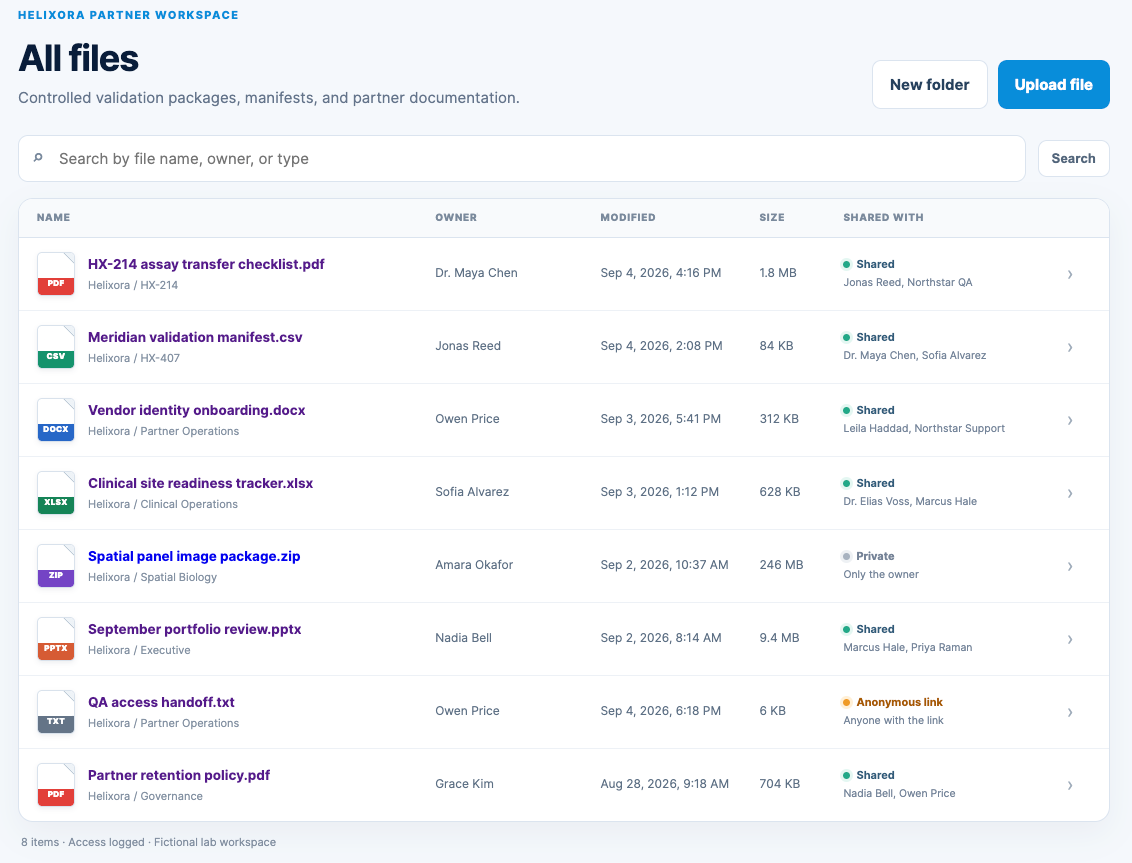
Northstar File Relay is the second major application in the lab. It is styled as an external controlled file-exchange platform used to share validation packages, manifests, project documents, and partner material. The interface behaves like a small document library rather than a placeholder page. It includes:
- all files;
- recent files;
- shared files;
- starred files;
- deleted files;
- type-specific file icons;
- file sizes, owners, and modified dates;
- sharing status and named recipients;
- detailed pages for individual files.
Each view contains a different set of records. Recent files are not simply a copy of all files. Starred items represent a deliberate subset. The trash contains its own deleted records. Selecting a file opens a details page that shows normal document metadata and who can access it.
This matters because the application needs to provide believable context. An agent should be able to distinguish a routine shared document from an unusual public link by inspecting the same kinds of properties a user or analyst would see in an ordinary file platform.
The Anonymous Handoff
Most Northstar content requires an authenticated workspace session. One item is different. A specific file has an anonymous sharing link. The reference to that link is not placed directly on the Helixora homepage. Instead, it appears in material that can be found while examining the lab's application and configuration surfaces. This creates a realistic reconnaissance handoff:
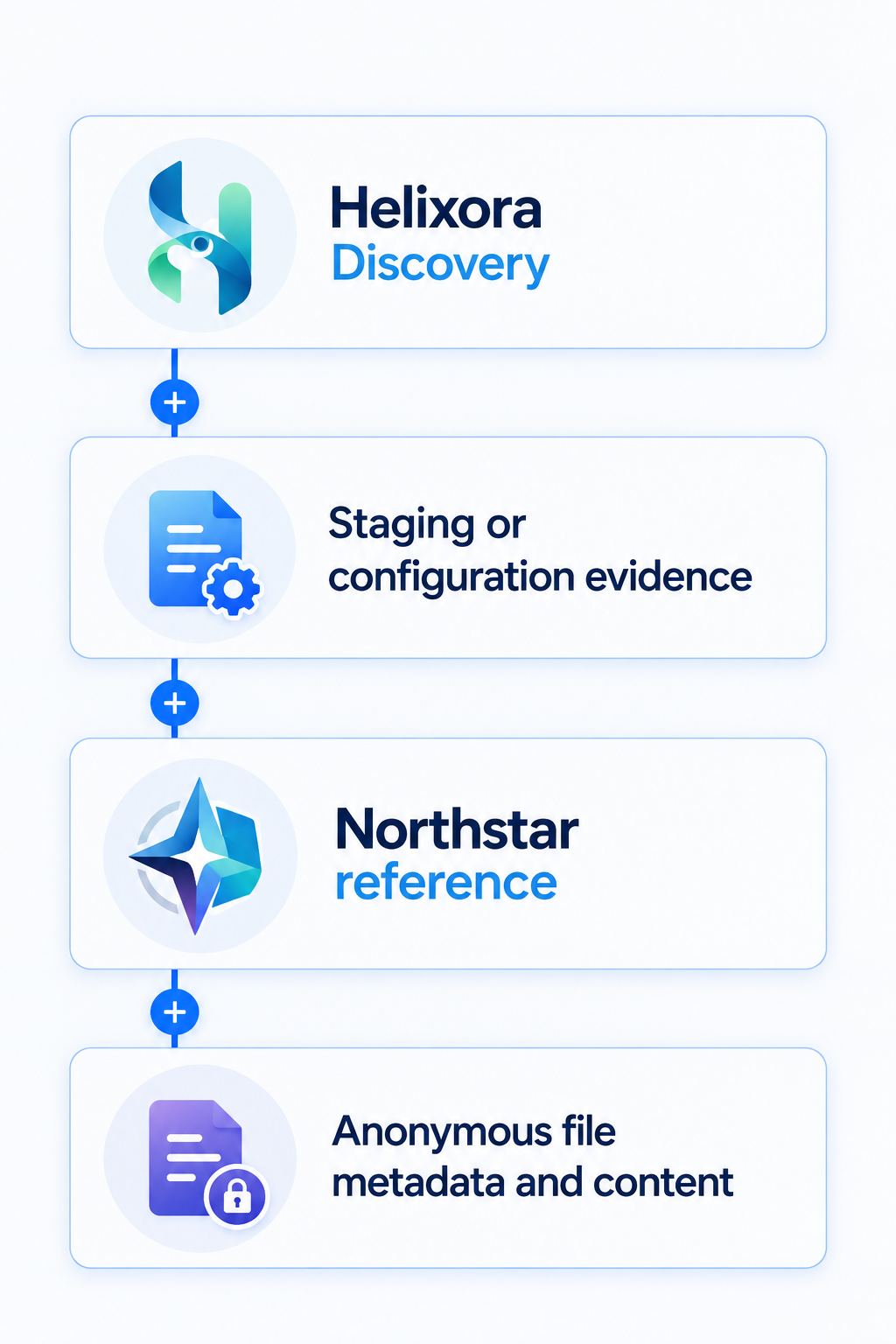
The shared item contains information that helps explain another part of the environment. It is not the final objective by itself. Its importance comes from the way it contributes to a larger chain. That is exactly the kind of relationship the shared evidence store is meant to preserve. One agent discovers the reference. Another agent evaluates the application. The analysis agent correlates the document with identities and API behavior. The validation agent independently repeats the relevant checks.
A Separate Recovery Weakness
Northstar also contains a password-recovery workflow with its own control weakness. It is deliberately separate from the anonymous share. This is important for the lab design. Not every vulnerability should be a required step in one carefully arranged chain. Real assessments often uncover independent issues that affect the same application in different ways.
The application security specialist examines the recovery workflow as an application feature. It records the observed behavior, explains the affected boundary, and preserves enough evidence for validation and reporting. The report can therefore distinguish between:
- evidence used in the principal compromise flow;
- independent application vulnerabilities;
- informational discoveries that explain the architecture;
- defensive observations about what was logged or prevented.
That distinction prevents the final output from becoming a flat list of unrelated scanner results.
The Main Compromise Flow
The lab's principal compromise flow begins with public discovery and ends with access to restricted Helixora program data. At a high level, the sequence is:
- The public Helixora site exposes organizational and employee context.
- Reconnaissance identifies the staging application and supporting services.
- Staging or configuration evidence reveals a relationship with Northstar File Relay.
- A Northstar item is accessible through an anonymous share.
- Information in that item provides useful service or access context.
- The agents correlate that evidence with the Helixora Program API.
- The API returns restricted program data without the control expected at that boundary.
- Directory evidence demonstrates a separate privilege mismatch for an authenticated employee role.
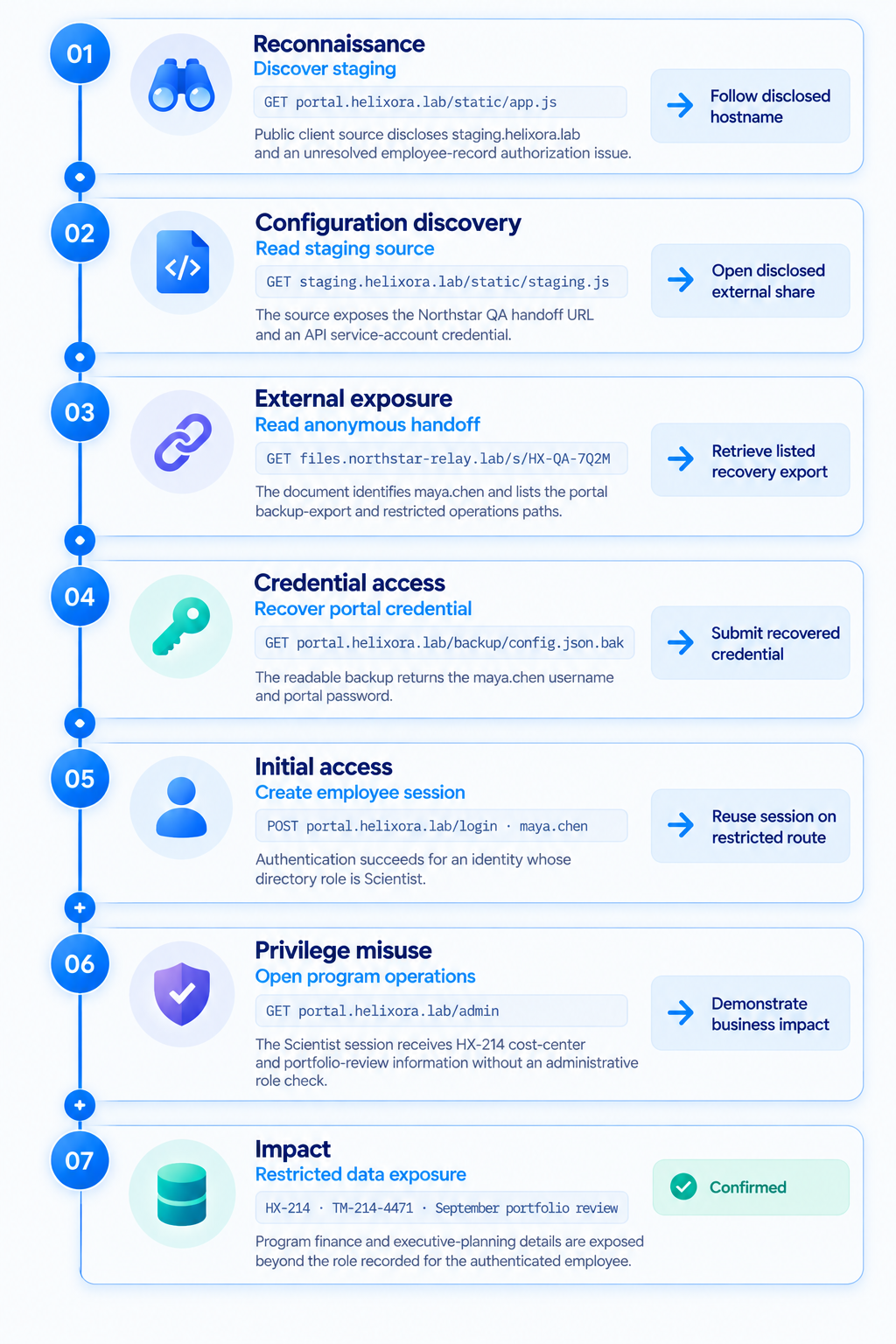
No single page needs to announce the entire issue. The conclusion is built from observations collected across several components.
That is a critical feature of the lab. The agents should describe facts as facts. A response body, label, comment, or document can provide evidence, but it cannot authoritatively explain away the security significance of its own behavior. Conclusions should come from independent correlation and repeatable testing.
Independent Web Vulnerabilities
The principal compromise flow is only one part of the assessment. Both applications also contain independent web weaknesses for the application security specialist to examine. These findings are not all connected to the same path, and they do not need to be. Their purpose is to let the specialist perform a focused application review alongside the broader reconnaissance workflow. This makes the assessment closer to the work of a small security team:
- one role maps the environment;
- one role examines application-specific behavior;
- one role correlates evidence across systems;
- one role independently validates outcomes;
- one role evaluates defensive visibility.
The specialist publishes observations into the same evidence store, allowing the final report to show which agent checked each surface, what it observed, and how the finding was validated.
The Agents Investigating the Environment
The lab currently uses a coordinator and five specialist roles.
Reconnaissance Agent
The reconnaissance agent maps the permitted environment. It discovers the sites, routes, APIs, identity data, staging references, and file-sharing relationship. It records observations without needing to decide the final severity of every item.
Application Security Specialist
The application security specialist performs a focused review of the web applications. It examines authentication behavior, password recovery, session and access-control boundaries, information disclosure, file-sharing behavior, and other independent application issues.
Analysis Agent
The analysis agent connects evidence from different sources. It compares directory roles with portal behavior, relates Northstar material to the program API, separates primary-chain evidence from independent findings, and identifies which conclusions still require validation.
Validation Agent
The validation agent repeats the important checks. Its role is not to accept the analysis agent's narrative. It records whether the observed behavior can be reproduced and whether the underlying evidence supports the conclusion.
Defender Agent
The defender agent reads a separate audit stream after the assessment activity has occurred. It determines which actions were detected, logged only, partially visible, not visible, prevented, or unsupported by sufficient evidence.
This means the defender does more than report whether a log file exists. It compares the testing activity with the telemetry produced by the applications and explains the resulting coverage gaps.
Two Different Evidence Streams
The lab separates assessment evidence from defensive telemetry. The agents conducting the assessment write observations, links, validations, and decisions to shared state. The applications independently record security-relevant events in an audit stream. The defender reads that stream after the activity and evaluates what the defensive side could see.
- Assessment activity -> shared findings and validation evidence
- Application behavior -> security events -> defender assessment
Keeping those streams separate is valuable. If the defender simply reads the offensive findings, it already knows what happened. When it relies on the audit stream, it must determine what could actually have been observed from the available telemetry. The final report can then compare both perspectives:
- what the testing agents did;
- what they discovered;
- what the applications logged;
- what the defender detected;
- what was prevented;
- where visibility was incomplete.
This connects testing activity, system behavior, and defensive coverage in a single learner artifact.
Everything Runs Locally
The environment is intentionally self-contained. Docker runs the applications and supporting services on local ports, while the lab tooling maps fictional hostnames to those local containers. The agents do not receive unrestricted network access. Their approved request layer recognizes the lab hostnames and rejects targets outside the configured scope. Conceptually, the boundary looks like this:
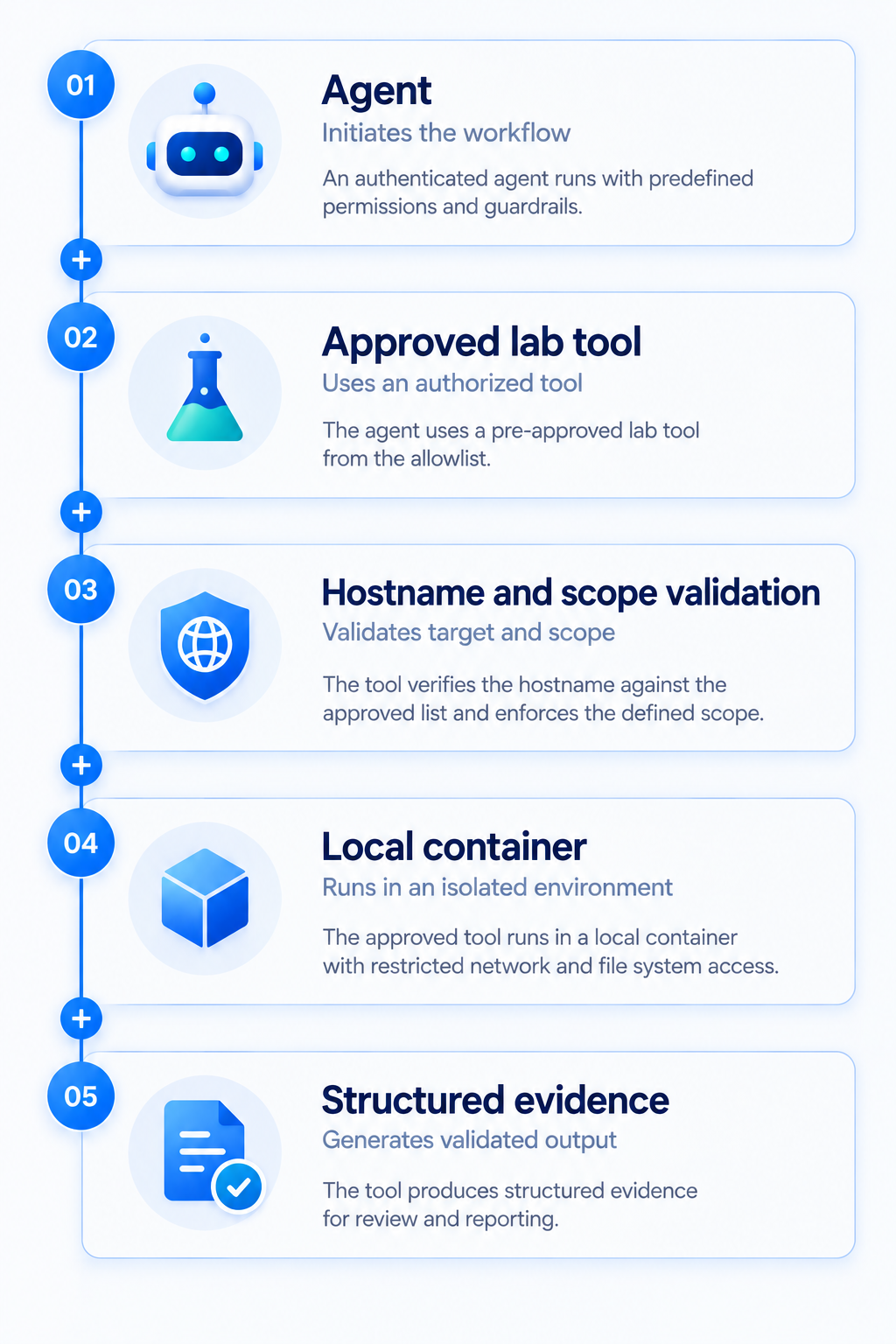
This keeps the exercise reproducible and makes it possible for a learner to inspect every component. It also means the same lab can be run automatically by the coordinator or manually one agent at a time.
The Model Provider Can Change
The orchestration layer is designed so that the lab is not tied to a single model provider. A learner can configure a supported provider such as Anthropic, OpenAI, or Google and supply the corresponding credential through the local environment configuration. The security workflow remains the same:
- the coordinator creates and sequences tasks;
- each specialist receives its role and available tools;
- deterministic tools collect evidence;
- the selected model interprets that evidence;
- observations are written to shared state;
- the report is generated from the recorded assessment.
Provider selection changes the model adapter, not the scope of the lab or the permissions available to the agent.
Automated and Learner-Led Modes
The complete exercise can be run in two ways. In coordinator mode, the coordinator starts the phases, invokes the specialist agents in the required order, manages shared state, and produces the final artifacts.
In learner-led mode, the learner runs each command manually. They effectively take the coordinator's role, starting each agent, inspecting its output, checking the shared evidence, and deciding when to move to the next phase. The two modes use the same applications, agents, tools, and evidence model. The difference is who advances the workflow.
This is important for training. Automation demonstrates orchestration, but manual execution makes the handoffs visible. A learner can pause after reconnaissance, inspect exactly what was discovered, and then run the application security, analysis, validation, and defender phases individually.
The Final Report
After the assessment and tests complete, the lab writes a standalone HTML report. The report is more than a vulnerability list. It includes:
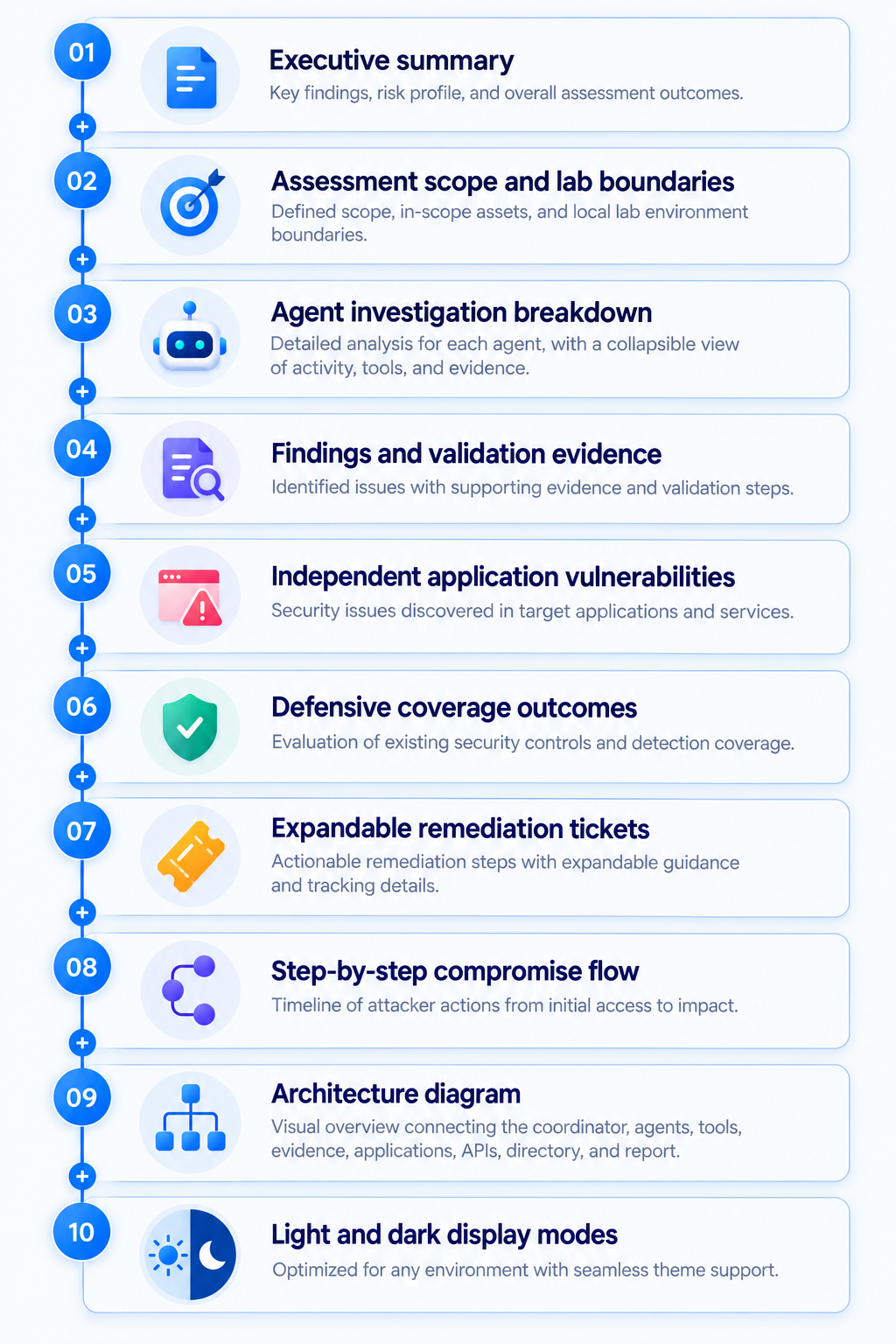
The agent breakdown explains what each specialist checked and what it found or decided. The compromise flow shows how evidence moved from public discovery to restricted data. The architecture diagram shows which components were identified and how they connect.
That distinction is useful:
- Agent breakdown = how the investigation was performed
- Compromise flow = how the security outcome was reached
- Architecture diagram = how the discovered environment fits together
- Defender section = what the environment could observe
Because the report is a standalone HTML file, a learner can open it locally after the containers have stopped. The evidence remains available without requiring the applications to stay online.
Why the Environment Needs This Much Detail
It would be easier to build a tiny application with one obvious weakness and ask an agent to find it. That would demonstrate tool use, but not much else. The extra detail in Helixora and Northstar creates ambiguity, relationships, and competing lines of investigation. Some discoveries identify architecture. Some establish identity context. Some become validated vulnerabilities. Some are unrelated application findings. Some generate useful telemetry. Some reveal defensive gaps. That gives the agents a more interesting job:
- decide what is evidence;
- decide what should be investigated next;
- avoid accepting self-serving explanations from application content;
- distinguish observation from conclusion;
- correlate identities and access;
- validate important outcomes;
- explain the result to a learner.
The goal is not to make the lab look complicated. It is to make the reasoning visible.
Where We Go Next
We now have the environment in which the agent workflow can operate: a fictional company, a realistic employee portal, a separate program API, a directory service, a staging application, an external-style file platform, independent application weaknesses, and defensive telemetry.
In the next article, we will follow the workflow itself. We will start with the coordinator, watch the specialist agents receive their tasks, examine how they use approved tools, and see how discoveries move through shared state. We will also compare the automated run with the learner-led commands and look at how the defender evaluates the audit trail after the assessment. The important part is not simply whether the agents reach the final finding.
It is whether we can inspect the evidence, understand every handoff, reproduce the checks, and see the same activity from both the testing and defensive sides.
That is what turns a collection of local applications into an agentic security learning environment.